Disclosure: As an Amazon Associate, KeenSift earns from qualifying purchases. Our links never affect our picks or the price you pay.
The short answer
The Rain Design mStand is the best laptop stand overall: a single-piece aluminum riser that lifts your screen about 6 inches to eye level and stays stable while you type. For travel, the 6-ounce Roost V3 folds smallest; for switching between sitting and standing, the tounee Telescopic adjusts highest.
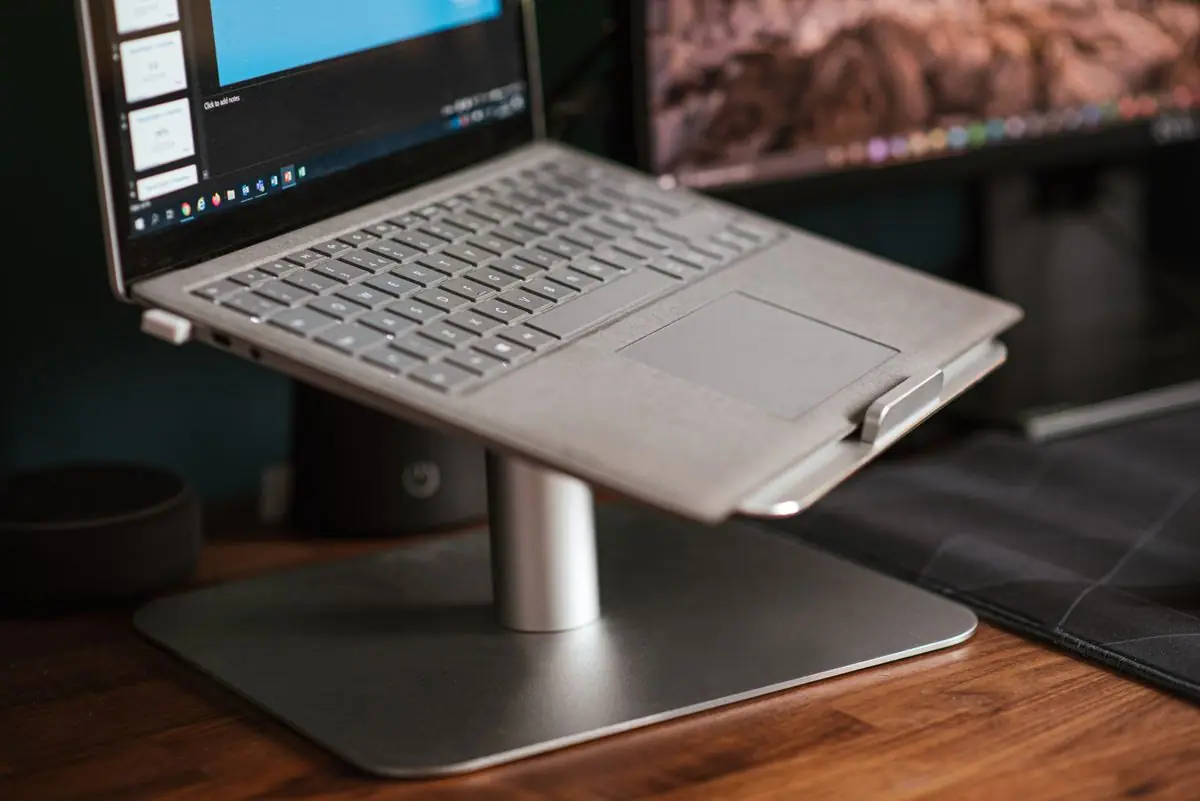
If you buy just one laptop stand, make it the Rain Design mStand. Forged from a single piece of aluminum, it raises your screen about 5.9 inches toward eye level, doubles as a heat sink to keep the chassis cool, and stays rock-solid while you type — the one thing thin folding stands rarely get right. It's a fixed-height riser, so it works best paired with an external keyboard and mouse at a home desk. That fixed design is also its main limitation: if you switch between sitting and standing, travel constantly, or want to fine-tune the angle, another stand will serve you better. Below we split the field by how you actually work — a premium desk riser, an ultralight stand that folds to the size of an umbrella for your bag, a telescoping sit-to-stand column, and budget aluminum risers that cover the basics. Every pick here is one we researched against manufacturer specs and owner reviews, not a random bestseller.
The best fixed-angle stand for a permanent desk paired with an external keyboard, where rigidity and clean cable routing matter more than adjustability.
Material
Single-piece aluminum
Design
Fixed angle (non-adjustable)
Screen Rise
5.9 in (150 mm)
Cable Management
Rear cable-routing outlet
Compatibility
MacBooks and most 13–16 in laptops (incl. 16-in MacBook Pro)
What we like
Single-piece aluminum is the most rigid platform in this guide — no wobble when typing
Rear cable outlet plus room to stow a keyboard keeps the desk tidy
The aluminum body doubles as a heat sink to help dissipate laptop heat
Worth noting
Fixed 5.9-inch rise can't be adjusted for a standing desk or unusually tall or short users
Heavy and non-folding, so it's a permanent desk fixture rather than a travel stand
At about 6 ounces it folds down to roughly umbrella size and disappears into a bag, yet its rigid folding truss and self-adjusting grips hold 12-18in laptops steadily — the clear pick if your desk changes daily.
Best for sit-to-stand switching
tounee Telescopic Laptop Stand
A telescoping column with a 360-degree swivel base that raises a laptop up to about 21 inches, letting you flip between sitting and standing postures at one desk — something no fixed riser can do. Expect some sway at full standing height.
Best budget riser
Lamicall Adjustable Laptop Stand
A foldable aluminum-alloy riser with a heavier base for stability, adjustable height and angle, and ventilation cutouts, fitting 10-17.3in laptops. It covers most of what the mStand does at a lower price.
Find your match
Which laptop stand should you actually buy?
Start with where you work. If you're at one desk most days with an external keyboard and mouse, the Rain Design mStand is the most rigid, clutter-free choice — just accept its fixed 5.9-inch height. Want to fine-tune height and angle, or occasionally pack it for travel? The Twelve South Curve Flex folds flat and spans about 2 to 11 inches. Living out of a bag? The 6-ounce Roost V3 packs the smallest. Alternating between sitting and standing at one desk? Only the tounee Telescopic reaches roughly 21 inches. On a tight budget, the Lamicall (aluminum, 10-17.3in) and the Amazon Basics stand (up to 15.6in) cover the basics for less.
No single stand wins for everyone. A fixed riser is the most stable but locks you to one height and needs an external keyboard, while adjustable and telescoping stands trade some rigidity for flexibility and portability. Buy for the way you actually work, not for the longest spec sheet.
How we picked
How to Choose the Best laptop stands
01
Decide fixed vs. adjustable first. A fixed riser like the Rain Design mStand is more rigid and clutter-free, but it locks you to one height, so it needs an external keyboard and mouse. Adjustable stands trade a little stability for the ability to fine-tune height and angle.
02
Do the eye-level math. Ergonomically, the top of your screen should sit at or just below eye level. For most people at a desk that means lifting a 13-15in laptop roughly 4-6 inches — the mStand's ~5.9in and the Twelve South Curve Flex's 2-11in range both land in that zone.
03
Check stability during typing. A single aluminum slab barely flexes, while thin folding sheets and tall telescoping columns can wobble at full extension. If you type hard, favor a rigid riser over a lightweight sheet.
04
Weigh portability against rigidity. The 6-ounce Roost V3 folds to about the size of an umbrella for a bag, but ultralight stands make compromises a desk-bound aluminum riser doesn't. Match the stand to where you'll actually use it.
05
Favor aluminum for heat and durability. Aluminum acts as a passive heat sink and resists flexing; plastic is cheaper and lighter but offers less cooling and rigidity. Look for open or ventilated designs that keep airflow under the chassis.
06
Confirm size and weight limits. Most of these fit 10-17in laptops, but ranges vary — the Roost V3 is rated for 12-18in laptops and the Amazon Basics stand up to 15.6in. A heavy 16-17in laptop should sit within, not at the edge of, a stand's rated capacity.
07
Handle sit-stand and clamshell needs separately. To alternate sitting and standing, a telescoping column like the tounee Telescopic that reaches about 21in does what a desk riser can't. And if you dock a closed laptop to an external monitor, you'll want a dedicated vertical/clamshell holder — none of these open risers is built for that.
Editor's Note — how we research
A few things the spec sheets gloss over. First, 'eye level' means the top of the screen, not the middle — most people at a desk need only 4 to 6 inches of lift, which is why the mStand's fixed 5.9 inches works for so many. Second, any fixed-height or tall stand assumes you'll add an external keyboard and mouse; typing on the laptop itself at screen-eye-level height strains your wrists and shoulders. Third, aluminum's real advantage beyond looks is that it barely flexes and sheds heat, whereas single-column telescoping stands and thin folding sheets get less stable the higher you raise them. Finally, mind the weight rating: a heavy 16-17in laptop should sit comfortably within a stand's rated capacity, not at its limit. These notes are drawn from manufacturer specifications and published owner feedback, not first-hand lab testing.
Our Take
“If we had to keep just one, it would be the Rain Design mStand. It's been the reference desk riser for years for a reason: one slab of aluminum with no wobble, a heat-sink body, and clean cable routing, at a price that undercuts the flashier adjustable stands. The catch is being honest about its limits — it's fixed-height, heavy, and desk-bound, so if you travel or want to stand, the Roost V3 or the tounee Telescopic earns its place instead. Buy the mStand for a permanent keyboard-and-mouse desk setup; reach for an adjustable or telescoping stand only if you genuinely need to move it or change its height.”
Frequently Asked Questions
What is the best laptop stand?
For most people the Rain Design mStand is the best overall laptop stand. It's a single piece of forged aluminum that lifts the screen about 5.9 inches to eye level, acts as a heat sink, and stays rigid while you type. Because it's fixed-height, use it with an external keyboard and mouse.
How high should a laptop stand raise my screen?
Aim to put the top of the screen at or just below eye level. For most people seated at a desk, that means lifting a 13-15in laptop about 4 to 6 inches. Fixed risers like the mStand (~5.9in) hit that range, while adjustable stands such as the Twelve South Curve Flex (2-11in) let you dial it in.
Are aluminum laptop stands better than plastic ones?
For most desk setups, yes. Aluminum flexes less, so it stays stable while you type, and it acts as a passive heat sink to help keep the laptop cool. Plastic stands are cheaper and lighter but tend to wobble more and offer less cooling. Look for open, ventilated designs either way.
What is the best portable laptop stand for travel?
The Roost V3 Laptop Stand is the standout for travel. It weighs about 6 ounces, folds down to roughly the size of an umbrella, and uses a rigid folding frame with grips that lock onto 12-18in laptops, so it's far steadier than most thin, sheet-style folding stands.
Can a laptop stand double as a standing desk?
A telescoping model can. The tounee Telescopic Laptop Stand extends from about 2 inches up to roughly 21 inches — high enough to use a laptop while standing — and its 360-degree swivel base makes it easy to reposition. It isn't as rock-solid as a fixed aluminum riser at full standing height, so pair it with an external keyboard and mouse when you stand. Fixed risers like the mStand can't reach standing height at all.
Where our specs come from
Sources
The Rain Design mStand is a single sturdy piece of aluminum that raises the screen 5.9 inches (150 mm) toward eye level, uses the aluminum body as a heat sink, and includes a rear cable outlet; it fits all MacBooks and is confirmed to hold the 16-inch MacBook Pro. Rain Design — official mStand product page
The Roost V3 weighs 6 oz (178 g), provides 6.5–12.5 inches of screen lift across 7 selectable height settings, and folds down to roughly 1 x 1.5 x 13 inches. Roost — official Roost V3 product page
The Twelve South Curve Flex is height- and angle-adjustable, supports laptops up to 7 pounds, folds flat for travel, and ships with a neoprene travel sleeve. Twelve South — official Curve Flex product page
Affiliate disclosure: As an Amazon Associate, KeenSift earns from qualifying purchases made via links on this page. This does not affect our editorial recommendations or the price you pay.